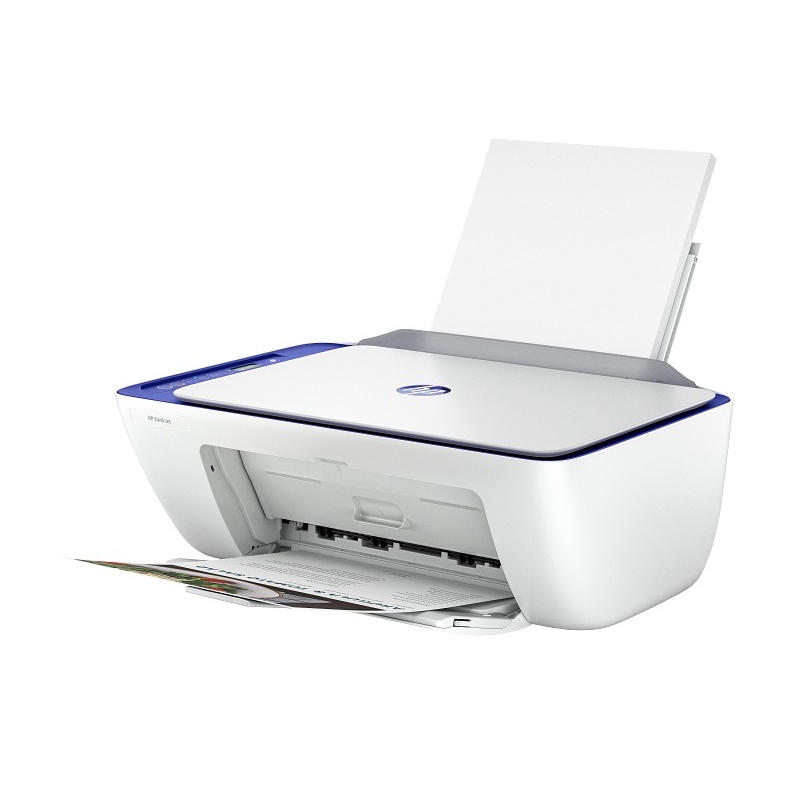
DescriptionHP DeskJet 2821e All-in-One Printer (588Q2B)HP DeskJet 2821e All-in-One Printer (588Q2B) All tech specsFunctionsPrint, copy, scanHP Product DisclaimerThis is an HP enabled printer. Choose HP at product setup to activate benefits. HP requires an HP account, ongoing connection to the internet, and exclusive use of Original HP Ink cartridges for the life of the printer.Instant inkHP Instant Ink eligible (Please refer to each individual SKU for further information. Some are I-Ink eligible others are not.)Print speed black (ISO)Up to 7.5 ppm 1Print speed black (draft, A4)Up to 20 ppm 1Print speed black (ISO, A4)Up to 7.5 ppm 1Print speed color (ISO)Up to 5.5 ppm 1Print speed color (draft, A4)Up to 16 ppm 1Print Speed Color (ISO)Up to 5.5 ppm 1First page out black (A4, ready)As fast as 15 sec 2First page out color (A4, ready)As fast as 19 sec 2Duplex printingManual (driver support provided)Duty cycle (monthly, letter)Up to 1,000 pagesUp to 1000 pages (Duty cycle is the maximum number of pages that can be printed in a month, but this page volume is not recommended on an ongoing basis.)Duty cycle (monthly, A4)Up to 1000 pages (Duty cycle is the maximum number of pages that can be printed in a month, but this page volume is not recommended on an ongoing basis.)Recommended monthly page volume50 to 100 (HP recommends the number of pages printed not exceed the recommended monthly page volume for optimum device performance.)Print quality black (best)Up to 1200 x 1200 rendered dpiPrint quality color (best)Up to 4800 x 1200 optimized dpi color (when printing from a computer on selected HP photo papers and 1200 input dpi)Print languagesHP PCL 3 GUI; HP PCLm (HP Apps/UPD); URF (AirPrint)Print technologyHP Thermal InkjetConnectivity, standard1 Hi-Speed USB 2.0 (device); 1 Wi-Fi 802.11b/g/nMobile printing capabilityHP app; Apple AirPrint; Chrome OS; Mopria-certified 3Network capabilitiesWi-Fi 802.11b/g/nWireless capabilityYes, built-in Wi-Fi 802.11b/g/nWireless technologies802.11b/g/nMinimum System Requirements for MacintoshmacOS V10.14 Mojave, macOS 10.15 Catalina, macOS 11 Big Sur, macOS 12 Monterey, macOS 13 Ventura; macOS 14 Sonoma; macOS 15 Sequoia; 2 GB HD; Internet requiredMinimum System RequirementsWindows 10, 11, : 1 GHz 32-bit (x86) or 64-bit (x64) processor, 2 GB available hard disk space, Internet connection, Internet Explorer.Digital sending standard featuresNoDisplayIcon LCD displayProcessor speed1.0 GHzMaximum Memory64 MB DDR1; 24 MB FlashMemory64 MB DDR1Internal StorageNoCompatible Operating SystemsWindows 11; Windows 10; macOS 10.14 Mojave; macOS 10.15 Catalina; macOS 11 Big Sur; macOS 12 Monterey; macOS 13 Ventura; macOS 14 Sonoma; macOS 15 Sequoia; Chrome OSPaper handling input, standard60-sheet input trayPaper handling output, standard25-sheet output trayFinished output handlingSheetfedMedia typesPlain paper, photo paper, brochure paper, envelopes and other specialty inkjet papersMedia sizes supportedA4; B5; A6; DL envelopeMedia sizes, custom76 x 127 to 215 x 355 mmBorderless printingNoMedia weight, recommended75 g/m²Scan resolution, opticalUp to 1200 dpiScan resolution, hardwareUp to 1200 x 1200 dpiAutomatic document feeder capacityNoCopy speed black (ISO)Up to 6 cpmCopy speed color (ISO)Up to 3 cpmCopy resolution (black text)Up to 300 x 300 dpiCopy resolution (color text and graphics)Up to 300 x 300 dpiCopy resolution (black graphics)Up to 300 x 300 dpiCopies, maximumUp to 9 copiesCopier settingsAuto-enlargeFaxingNoPower consumption2.8 W (ready), 1.4 W (sleep), 0.3 W (auto-off), 0.3 W (off); For China: 2.8 W (ready), 1.4 W (sleep), 0.3 W (auto-off), 0.3 W (off). 4 (Power requirements and consumption are based on the country/region where the printer is sold. Do not convert operating voltages. This will damage the printer and void the product warranty.)PowerInput voltage: 100 to 240 VAC ( /- 10%), 50/60 Hz ( /- 3 Hz), 350mA. India input voltage: 200 to 240 VAC ( /- 10%), 50/60 Hz ( /- 3 Hz), 350mA.Operating humidity range15 to 80% RH (non-condensing)Recommended operating humidity range20 to 80% RH (non-condensing)Non-Operating Humidity Range5 to 90% RH (non-condensing)Operating temperature range5 to 40°COperating temperature range41 to 104°FSafetyIEC 60950-1:2005 A1:2009 A2:2013, IEC 62368-1:2014, IEC 62368-1:2018, EN IEC 62368-1:2020 A11:2020, EN 62311:2008, EN 50663:2017, EN 50665:2017Dimensions (W x D x H)425 x 304 x 154 mm 5 (Dimensions vary as per configuration)Maximum dimensions (W x D x H)425 x 546 x 250 mm (Output Extension fully out) 5 (Dimensions vary as per configuration)Weight3.42 kg (Weight varies as per configuration)Product colorMoroccan BlueWhat’s in the boxHP DeskJet 2821e All-in-One Printer; HP 305 Setup Black Cartridge (~120 pages yield); HP 305 Setup Tri-Color Cartridge (~100 pages yield); Regulatory flyer; Setup guide; Reference guide; Power cord [For ink volume and page yield information, visit http://hp.com/go/learnaboutsupplies] 6Print Cartridges/Bottle, Number2 (1 each black, tri-color)Replacement cartridgesHP 305 Black Original Ink Cartridge (~120 pages yield) 3YM61AE; HP 305XL Black High-Yield Original Ink Cartridge (~240 pages yield) 3YM62AE; HP 305 Tri-Color Original Ink Cartridge (~100 pages yield) 3YM60AE; HP 305XL Tri-Color High-Yield Original Ink Cartridge (~200 pages yield) Actual yield varies considerably based on content of printed pages and other factors. For details see http://www.hp.com/go/learnaboutsupplies 7Manufacturer WarrantyOne-year limited warranty. For more info please visit us at http://support.hp.com .For full terms and conditions visit: www.hp.com/go/orderdocuments .Warranty and support options vary by product, country, and local legal requirements