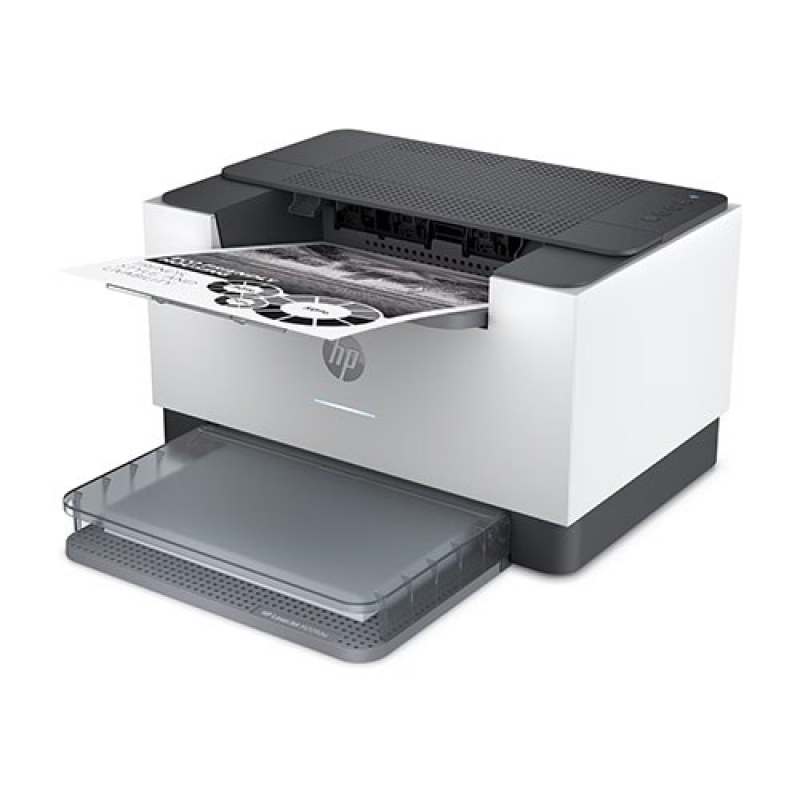
DescriptionHP LASERJET M209DW PRINTERPrint Speed – Black (normal)Up to 30 ppmPrinter page yieldDeclared yield value in accordance with ISO/IEC 19752 and continuous printing. Actual yields vary considerably based on images printed and other factors.First page out (ready) blackAs fast as 6.9 secResolution (black)Up to 600 x 600 dpiMonthly duty cycleUp to 20,000Recommended monthly page volume200 to 2,000Print TechnologyLaserProcessor speed500 MHzNumber of print cartridges1 (black)Replacement cartridgesHP 134A Black LaserJet Toner Cartridge, W1340A (~1100), HP 134X Black LaserJet Toner Cartridge, W1340X (~2400)[6]Product disclaimerThis printer is intended to work only with cartridges that have a new or reused HP chip, and it uses dynamic security measures to block cartridges using a non-HP chip. Periodic firmware updates will maintain the effectiveness of these measures and block cartridges that previously worked. A reused HP chip enables the use of reused, remanufactured, and refilled cartridges. More at:Print languagesPCLmS; URF; PWGAutomatic paper sensorYesPaper trays, standard1Paper trays, maximum1Mobile Printing CapabilityApple AirPrint™; Mopria™ certified; HP app; Wi-Fi Direct® printingConnectivity, standard1 Gigabit Ethernet 10/100/1000 Base-TX network; 1 Hi-Speed USB 2.0 (device); Wireless 802.11b/g/n, Dual band 2.4GHz/5GHzSecurity managementSecure Boot, Secure Firmware Integrity, Runtime Code Integrity, password protected EWS, secure browsing via SSL/TLS 1.0, TLS 1.1, TLS 1.2; TLS 1.0/1.1 disabled by default; Update to OpenSSL version 1.1.1; enable/disable Network ports; SNMPv1, SNMPv2, and SNMPv3, community password change; Secure defaults, Encrypted data at rest, Active FW update, Admin password by default, Cipher & TLS selection; Account lockout; Secure Wi-Fi setupMinimum system requirementsApple® macOS High Sierra (v10.13) macOS Mojave (v10.14) macOS Catalina (v10.15) macOS Big Sur (v11); 2 GB HD; Internet requiredMicrosoft® Windows® 10, 8.1, 8, 2 GB available hard disk space, Internet connection, Microsoft® Internet Explorer.Compatible operating systemsWindows 11; Windows 10; Windows 8; Windows 8.1; macOS 10.14 Mojave; macOS 10.15 Catalina; macOS 11 Big Sur; macOS 12 Monterey; macOS 15 Sequoia; Linux[14]Memory, standard64 MBMemory, maximum64 MBPrinter managementHP Printer Assistant (UDC); HP Device ToolboxSupported network protocolsTCP/IP: IPv4; IPv6; LPD; SLP; Bonjour; WS-Discovery; BOOTP/DHCP/AutoIP; SNMP v 1/2/3;HTTP/HTTPS; UDP; IPPHard diskNonePaper handling input, standard150-sheet input trayPaper handling output, standard100-sheet output trayDuplex printingAutomatic (standard)Media sizes supportedLetter, legal, executive, envelopesMedia sizes supportedA4; A5; A6; B5 (JIS)Media sizes, custom4 x 6 to 8.5 x 14 inMedia typesPaper (laser, plain, rough, vellum), envelopes, labels, cardstock, postcardSupported media weight16 to 43 lbMedia weights by paper path60 to 163 g/m²Power110-volt input voltage: 110 to 127 VAC ( /- 10%), 60 Hz/50 Hz, 4.6 APower consumption420 watts (active printing), 2.0 watts (ready), 0.5 watts (sleep), 0.5 watts (Auto Off/Wake on USB, enabled at shipment), 0.04 watts (Auto-off/Manual-on), 0.04 (Manual Off)Energy efficiencyENERGY STAR® certifiedOperating temperature range59 to 90.5º FRecommended operating temperature63.5 to 77º FOperating humidity range30 to 70% RHSoftware includedDownloadable Software from hp.com or 123.hp.com #CD include HP Software Installer, Uninstaller, printer driver and other essential tools.WarrantyOne-year limited warrantyDimensions (W X D X H)13.98 x 11 x 8.07 inDimensions Maximum (W X D X H)13.98 x 16.80 x 10.43Weight12.35 lbPackage weight16 lbWhat’s in the boxHP LaserJet Pro M209dw Printer; HP Black LaserJet Toner Cartridge(~700 pages); Dust Cover; Reference Guide, Setup Poster, Warranty Guide & Flyer in some countries; Power cordCable includedNo, USB cable for all regionsSustainability ImpactMercury freeWireless capability1 built-in Wi-Fi 802.11b/g/nHP LASERJET M209DW PRINTERPrint Speed – Black (normal)Up to 30 ppmPrinter page yieldDeclared yield value in accordance with ISO/IEC 19752 and continuous printing. Actual yields vary considerably based on images printed and other factors.First page out (ready) blackAs fast as 6.9 secResolution (black)Up to 600 x 600 dpiMonthly duty cycleUp to 20,000Recommended monthly page volume200 to 2,000Print TechnologyLaserProcessor speed500 MHzNumber of print cartridges1 (black)Replacement cartridgesHP 134A Black LaserJet Toner Cartridge, W1340A (~1100), HP 134X Black LaserJet Toner Cartridge, W1340X (~2400)[6]Product disclaimerThis printer is intended to work only with cartridges that have a new or reused HP chip, and it uses dynamic security measures to block cartridges using a non-HP chip. Periodic firmware updates will maintain the effectiveness of these measures and block cartridges that previously worked. A reused HP chip enables the use of reused, remanufactured, and refilled cartridges. More at:Print languagesPCLmS; URF; PWGAutomatic paper sensorYesPaper trays, standard1Paper trays, maximum1Mobile Printing CapabilityApple AirPrint™; Mopria™ certified; HP app; Wi-Fi Direct® printingConnectivity, standard1 Gigabit Ethernet 10/100/1000 Base-TX network; 1 Hi-Speed USB 2.0 (device); Wireless 802.11b/g/n, Dual band 2.4GHz/5GHzSecurity managementSecure Boot, Secure Firmware Integrity, Runtime Code Integrity, password protected EWS, secure browsing via SSL/TLS 1.0, TLS 1.1, TLS 1.2; TLS 1.0/1.1 disabled by default; Update to OpenSSL version 1.1.1; enable/disable Network ports; SNMPv1, SNMPv2, and SNMPv3, community password change; Secure defaults, Encrypted data at rest, Active FW update, Admin password by default, Cipher & TLS selection; Account lockout; Secure Wi-Fi setupMinimum system requirementsApple® macOS High Sierra (v10.13) macOS Mojave (v10.14) macOS Catalina (v10.15) macOS Big Sur (v11); 2 GB HD; Internet requiredMicrosoft® Windows® 10, 8.1, 8, 2 GB available hard disk space, Internet connection, Microsoft® Internet Explorer.Compatible operating systemsWindows 11; Windows 10; Windows 8; Windows 8.1; macOS 10.14 Mojave; macOS 10.15 Catalina; macOS 11 Big Sur; macOS 12 Monterey; macOS 15 Sequoia; Linux[14]Memory, standard64 MBMemory, maximum64 MBPrinter managementHP Printer Assistant (UDC); HP Device ToolboxSupported network protocolsTCP/IP: IPv4; IPv6; LPD; SLP; Bonjour; WS-Discovery; BOOTP/DHCP/AutoIP; SNMP v 1/2/3;HTTP/HTTPS; UDP; IPPHard diskNonePaper handling input, standard150-sheet input trayPaper handling output, standard100-sheet output trayDuplex printingAutomatic (standard)Media sizes supportedLetter, legal, executive, envelopesMedia sizes supportedA4; A5; A6; B5 (JIS)Media sizes, custom4 x 6 to 8.5 x 14 inMedia typesPaper (laser, plain, rough, vellum), envelopes, labels, cardstock, postcardSupported media weight16 to 43 lbMedia weights by paper path60 to 163 g/m²Power110-volt input voltage: 110 to 127 VAC ( /- 10%), 60 Hz/50 Hz, 4.6 APower consumption420 watts (active printing), 2.0 watts (ready), 0.5 watts (sleep), 0.5 watts (Auto Off/Wake on USB, enabled at shipment), 0.04 watts (Auto-off/Manual-on), 0.04 (Manual Off)Energy efficiencyENERGY STAR® certifiedOperating temperature range59 to 90.5º FRecommended operating temperature63.5 to 77º FOperating humidity range30 to 70% RHSoftware includedDownloadable Software from hp.com or 123.hp.com #CD include HP Software Installer, Uninstaller, printer driver and other essential tools.WarrantyOne-year limited warrantyDimensions (W X D X H)13.98 x 11 x 8.07 inDimensions Maximum (W X D X H)13.98 x 16.80 x 10.43Weight12.35 lbPackage weight16 lbWhat’s in the boxHP LaserJet Pro M209dw Printer; HP Black LaserJet Toner Cartridge(~700 pages); Dust Cover; Reference Guide, Setup Poster, Warranty Guide & Flyer in some countries; Power cordCable includedNo, USB cable for all regionsSustainability ImpactMercury freeWireless capability1 built-in Wi-Fi 802.11b/g/n